
You've probably spent hours on a blog post that barely moved the needle. You nailed the SEO, the research was solid, and you hit publish feeling pretty good about it. Then what? Some traffic trickles in. Maybe a few conversions. But deep down, you know it should be doing way more.
Here's what nobody talks about: that blog post you spent six hours on? It's working at maybe 20% of its potential. And I'm not exaggerating.
The problem isn't your content. The problem is you're treating each blog post like a standalone thing. You write it, publish it, move on. Meanwhile, everyone else is multiplying their reach by turning that same piece of content into five, ten, sometimes fifteen different formats across different platforms. (The same principle applies to podcasts too—check out our podcast to shorts repurposing framework.)
The Real Story Behind Content Repurposing
Before we dive into the how, let's talk about why this actually matters.
Video Dominance in 2025
Video makes up 82% of all internet traffic in 2025. That's not a cute statistic—that's reality. People aren't reading anymore. They're watching. And the platforms know it. According to industry data, video consumption continues to accelerate year over year.
Here's what actually happens when you repurpose your blog into short-form video: your conversion rates jump 86%. Your engagement multiplies by 2.5x compared to long-form content. You get 1,200% more shares than you would with just text and images. And 93% of marketers are reporting legit ROI from this stuff.
But here's the thing that gets me—73% of consumers actively prefer short-form video when they're researching something. They're literally asking for it. The audience is there, waiting. Your competitors are already taking advantage of it.
Efficiency at Scale
When you repurpose strategically, teams see 3-5x jumps in their content output without hiring anyone new. Your cost per asset drops by 60-70%. That's not incremental improvement—that's a game-changer for your budget.
Plus, Google is now prioritizing video in search results. Short-form video visibility has grown over 300% in the last two years. If you want to rank, you need to be in video.
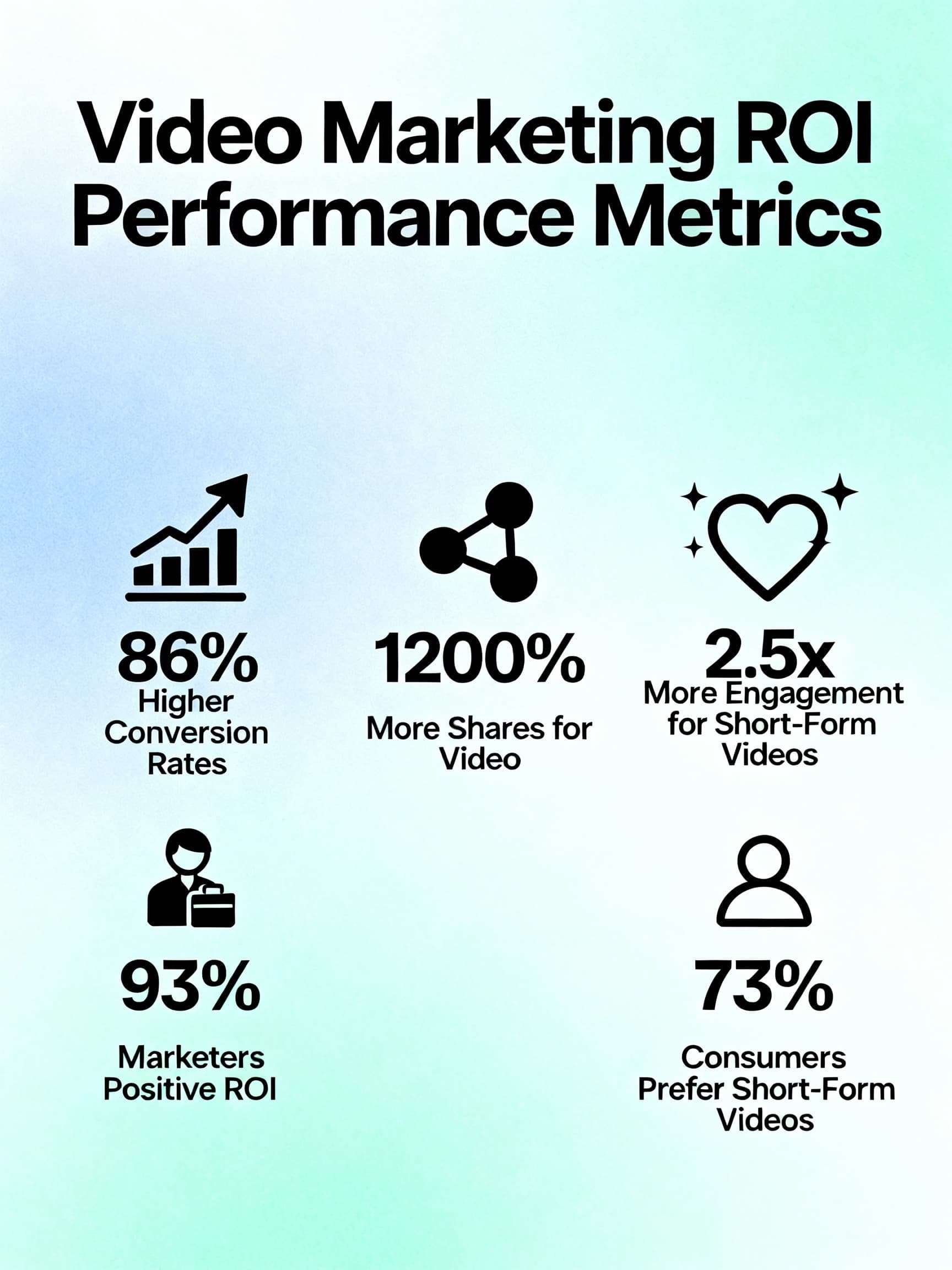
Key ROI statistics showing how content repurposing multiplies reach: 86% conversion rate increase, 2.5x engagement boost, and 1,200% more shares compared to single-format content.
Picking the Right Blog Posts (This Actually Matters)
Not every blog post deserves to become a video. Some pieces are just... forgettable. And you'd waste your time and effort converting them.
The key is being strategic about which ones you choose.
Start by pulling your analytics. Which posts have consistently driven traffic? Which ones do people actually stay on? Look for the ones that have already proven they resonate with your audience. If something worked once, it'll likely work across other formats because the core idea is already validated.
Evergreen content is your friend here. Posts that people search for in six months and two years from now? Those are gold. Avoid the trendy stuff that expires. You want content that keeps generating views and engagement long-term.
Pay attention to posts that are ranking on page two or three. These are hidden opportunities. Your content is relevant enough to rank, but it's not dominating. Adding a video dimension could be exactly what bumps it to page one. The algorithm loves when you give search-ranked content a boost in a new format.
Look for posts where you can actually show something. Tutorials, case studies, transformations, step-by-step processes—these translate beautifully to video. Dense theoretical posts are harder. Can you visualize the concept? If yes, it's worth your time.
Quick Selection Checklist
- Proven traffic: Post already gets consistent views
- Evergreen topic: Still relevant in 6-24 months
- Page 2-3 ranking: Room to improve with video dimension
- Visual potential: Can show process, not just explain
Quick test: does your post hit at least three of these criteria? If it does, repurpose it. If not, keep looking.
How to Actually Convert a Blog Post Into a Video
This is where most people mess up. They think they can just read their blog post out loud and turn it into a video. That doesn't work.
Blog writing is formal. Video needs to be conversational. Blog readers have time to absorb dense information. Video watchers have about three seconds before they scroll past.
First, Rewrite Your Script
Take your blog and translate it into something that sounds like you're talking to a friend. Use contractions. Use "you" and "I." Cut anything that doesn't earn its spot. Strip out the fluff.
Your hook is everything. The first three to five seconds will make or break this. Don't start with background information. Start with the promise. Instead of "Let's talk about content repurposing," try "Repurposing one blog post generates 10x more content. Here's exactly how."
Your video script should be about 30-50% shorter than your blog post. If your blog is 2,000 words, your 60-second video script should be around 150-170 words. Tight. Punchy. No wasted words.
Next, Think About Your Visuals
What can you show? What graphics work? What clips do you need? You don't need to be fancy here. Even a rough outline helps. When you're working with AI tools, this planning step saves massive time because you're giving better prompts. When you're filming yourself, it keeps you focused.
Choose Your Tool Based on Your Comfort Level
There are basically three approaches. You can use AI to generate almost everything (Pictory, Lumen5, Invideo AI)—feeds it your content, it spits out a video in minutes. You can do it manually with CapCut or Adobe Premiere—takes longer but gives you full control. Or—and this is what actually works best—you can do a hybrid where AI does the heavy lifting and you refine it afterward.
The hybrid approach usually takes 18-40 minutes total from blog to finished video. AI generates a rough draft in 5-10 minutes. You spend another 10-15 minutes tweaking, fixing pacing, adjusting visuals, making it sound like you. That's reasonable.
Now Optimize for the Platform
This is crucial and people constantly miss it. A video that crushes on TikTok might flop on YouTube Shorts because the editing rhythm is different.
All platforms want 9:16 vertical format. 1080x1920 resolution. Always add captions—85% of viewers watch without sound. Your first three seconds have to stop the scroll. Learn more about caption strategies in our guide on viral caption styles that boost retention.
But beyond that, each platform has its own personality. We'll get into the specifics in a moment, but the point is: don't just upload the same video everywhere and expect the same results. They need tweaks. For a deep dive into platform optimization, check out our multi-platform video distribution strategy.
Finally, Add Your SEO Layer
Get your primary keyword into your title, your description, and say it in the first five seconds of the video. Put it on screen as text too. This helps with both the algorithm and actual viewer comprehension.
Use 3-8 hashtags. Mix broad ones with niche ones. Include a link back to your full blog post in the description.
TikTok, YouTube, Instagram, LinkedIn—They're All Different
Most creators treat all platforms the same. That's the mistake.
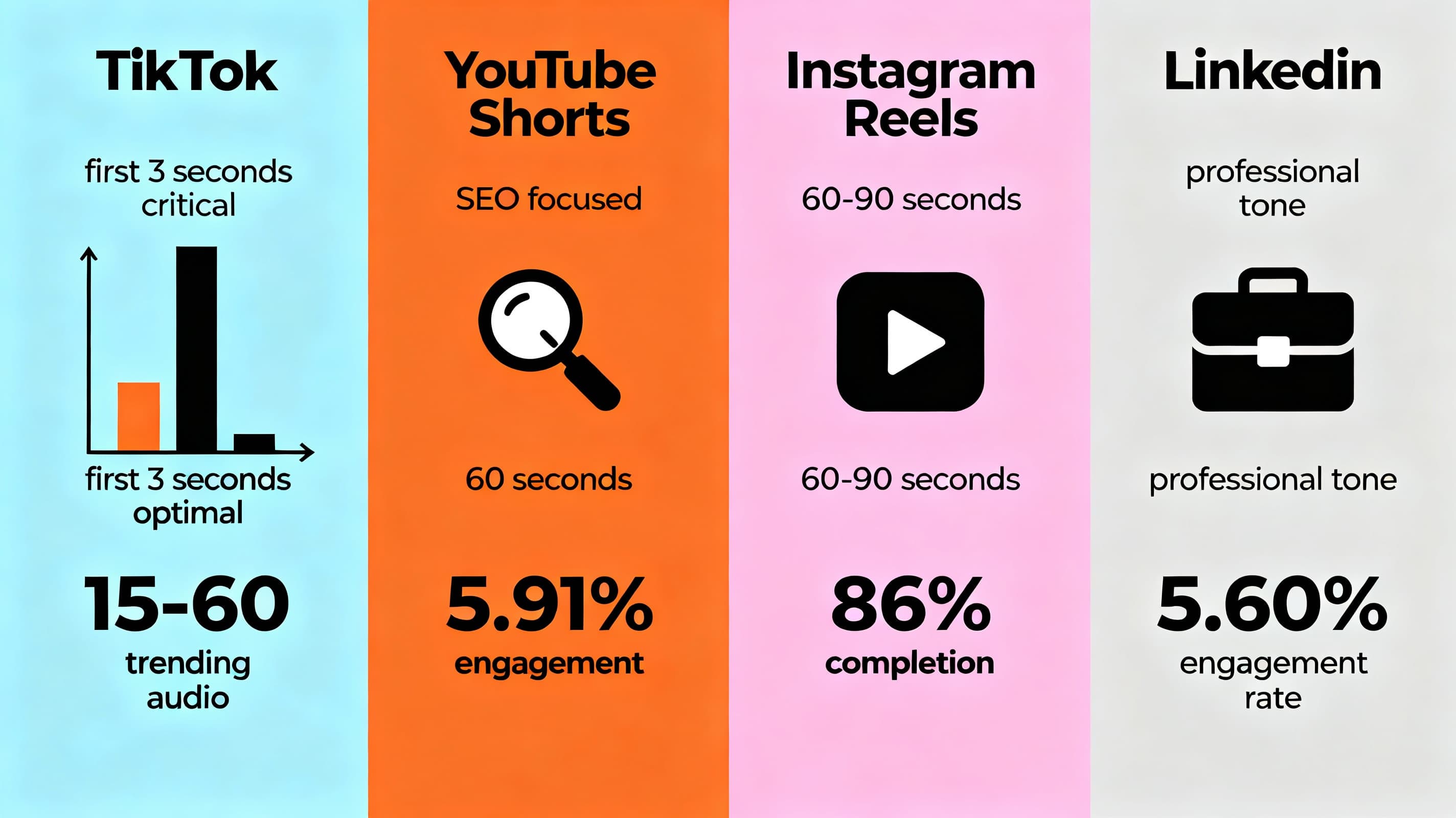
Platform-specific video optimization requirements for TikTok, YouTube Shorts, Instagram Reels, and LinkedIn - each platform has unique algorithm preferences and viewer behaviors.
TikTok: Stop the Scroll in 3 Seconds
TikTok‘s algorithm wants your first three seconds to be a stop-the-scroll moment. The algorithm doesn't care how many followers you have. It cares about watch time and completion rate. If people stop watching at second four, the algorithm tanks your reach. Period.
Keep videos between 15-60 seconds. Shorter often performs better because completion rates are higher. Trending audio matters—use sounds that match your content's vibe. But here's the thing: don't just use trending audio randomly. If you're teaching something, find audio that enhances the teaching, not distracts from it.
The hook placement is aggressive. Your first three words need to be magnetic. Lead with curiosity or utility. "This simple change boosted my engagement by 340%"—that's a hook. Not "Let me tell you about engagement strategies."
YouTube Shorts: SEO Matters Here
YouTube Shorts are different because they're partly search-driven. You can get discovered in the Shorts feed, but you can also show up in YouTube search results. This is huge. It means you should care about SEO in ways you don't on TikTok.
Include your keyword in the title, description, and first few seconds of audio. Use relevant hashtags. YouTube's algorithm weights hashtag relevance heavily. Videos that get watched all the way through or watched twice perform better because YouTube sees that as a quality signal.
Most YouTube Shorts get around 5.91% engagement rate, which is solid. The real advantage? When someone finishes your Short, YouTube often recommends your longer videos or related content. You're not just getting views—you're driving traffic back to your channel and your blog.
Instagram Reels: Visuals Win Here
Instagram Reels prioritize saves and shares. These interactions tell the algorithm "this is good content." Visual polish matters more on Instagram than on other platforms. Good lighting, clean composition, intentional colors. You don't need expensive gear—just think about your framing.
Stick to 60-90 seconds for best engagement, though Instagram now allows longer. Smooth transitions and matching your visual aesthetic performs better. People can complete the video even longer when it looks polished.
Instagram Reels drive 49% higher engagement than regular posts. Completion rates hit up to 86%. People are watching these all the way through. Design with that in mind. Strong opening, smooth pacing, a satisfying ending that makes people want to save or share.
LinkedIn: Authenticity Wins
LinkedIn is where authenticity wins. This platform is moving away from corporate polish. Raw, real, genuine—this is what gets engagement. Personal stories, honest struggles, actual insights.
Most people watch for 13-15 seconds on average, but keep videos between 30-90 seconds. LinkedIn audiences have more patience than TikTok users. Educational content dominates. Users want to learn something or feel validated in their experience.
Don't use trendy TikTok audio. Let your voice shine. Clear, confident delivery often outperforms background music. Comments, shares, and profile visits get weighted heavily by the algorithm. Encourage comments by asking questions. Respond to every single comment quickly—LinkedIn uses response rate as a quality signal.
Video content is growing 1.6x faster than other content types on LinkedIn. It's an open opportunity right now. For more LinkedIn-specific strategies, read our complete LinkedIn playbook for 2026.
The Three-Layer Keyword Strategy
Most people think video SEO means cramming keywords into the title and description. That's like 20% of the equation.
Real video SEO has three layers, and they all need to work together.
Your primary keyword should appear in the first five seconds of your video. Not buried somewhere. Said clearly. YouTube can transcribe audio, so when your keyword appears early, the algorithm knows you're on-topic immediately. Plus, viewers decide whether to keep watching in those first seconds. Saying your keyword helps with both the algorithm and actual retention.
Put your keyword on screen within the first three seconds. Could be a title card, text overlay, graphic—whatever. This reinforces the topic for viewers. It helps with accessibility. And it signals relevance to the algorithm because text within video is indexed.
Your title, description, and hashtags. Include your keyword 1-2 times naturally. Add a link to your full blog post. Use related long-tail keywords too.
But here's what actually works at scale: create multiple videos targeting related keywords. One video targets "blog to video conversion." Next one targets "repurpose blog content." Third targets "YouTube Shorts SEO." This cluster approach signals expertise to search engines and helps you capture a wider net of searches. For the full deep dive on Shorts SEO, check out our complete guide to short-form video SEO.
The Tools That Actually Work
There's a lot of noise around video tools. Let me cut through it.
Pictory AI
Pictory AI is pure automation. Paste a blog URL or text. It reads it, summarizes the key points, generates a script, pulls relevant footage, adds voiceover, produces a finished video. From blog to done in 5-10 minutes. The tradeoff? Videos can feel generic. Voiceovers aren't always natural. You usually need to manually refine the output, which takes another 5-15 minutes. But if you need speed, this is it.
Lumen5
Lumen5 sits in the middle. You input your script or article. They provide templates and automatically select visuals to match your content. Takes 10-15 minutes. More control than Pictory, but the templates can make everything look similar. Their visual selection isn't always perfect, but it's decent for quick turnarounds.
Descript
Descript is transcript-based editing. Upload a video or audio file. They transcribe it, let you edit video by editing the transcript, generate captions automatically. Takes 15-30 minutes depending on how much editing you do. Great for podcast repurposing or extracting clips from longer videos. Not ideal if you're starting from a blog post, but excellent for refinement.
OpusClip
OpusClip finds viral moments. Upload a longer video—podcast episode, Zoom recording, livestream—and their AI identifies the most engaging 15-60 second segments and creates multiple shorts automatically. 3-5 minutes. Minimal manual work. The algorithm actually scores potential virality decently well. This is perfect if you have source video.
ChatGPT
ChatGPT might seem obvious, but don't skip it. Paste your blog post. Prompt: "Rewrite this for a 60-second video script. Conversational tone. Hook-first structure. Include the main takeaway in the first sentence." 2-3 minutes and you have a solid video-ready script. It's not magic, but it saves massive time on scripting.
The Winning Workflow
Want to save even more time? Check out our guide on video workflow automation to learn how to batch your content creation.
Here's the workflow that actually produces the best results fastest:
- ChatGPT scripting: 2 minutes
- Quick storyboard: 3 minutes
- Pictory or Lumen5: 5-10 minutes
- Manual refinement in CapCut: 10-15 minutes
- SEO metadata: 3 minutes
Total time: 23-43 minutes per video
That's fast enough to do 3-4 videos a week without losing your mind.
Automate Your Entire Workflow
Our AI Video Clipper combines the best of these tools in one platform. Upload your blog, get fully edited vertical videos ready to post. No need to juggle multiple tools.
Try the AI Video Clipper →Making People Actually Stop and Watch
The hook is where 80% of videos die. You can have incredible information, perfect production, solid SEO. If your hook sucks, it doesn't matter.
You have three seconds. Maybe five if you're lucky.
Contrarian Hooks Work
Challenge the assumption. Flip the expected narrative. "Everyone says this will make your videos viral. They're lying." Cognitive dissonance makes people stop. Their brain demands an answer. They keep watching because they want to know what you're about to say.
Problem + Promise Hooks Work
Acknowledge the pain immediately and offer the solution. "Tired of blog posts getting buried? Here's how to repurpose them into viral shorts." Empathy is powerful. People recognize their own struggle in your opening line.
Curiosity Hooks Work
"99% of creators miss this when repurposing content." Question marks in people's minds. Open loops demand closure. They keep watching to get the answer.
Data Hooks Work
Lead with a surprising statistic. "Repurposed content generates 10x more reach than original posts." Numbers are memorable. They're credible. They also help with SEO because they're searchable.
Story Hooks Work
Start with a relatable moment. "I spent three hours writing a blog post nobody read. Then I did this one thing..." Stories create emotional connection. People relate to struggles and wins. They want to know what happens next.
Pro Tip: Keeping People Engaged
Once you've got people watching, what keeps them engaged? Fast pacing. Don't let shots sit too long. Cut every 1-3 seconds. Deliver value immediately—don't make people wait until the end. Show what you're saying with visuals or text overlays. Change visual style every 5-10 seconds to prevent boredom. End with something loop-worthy if possible. When someone can watch it twice without realizing it's repeated, watch time spikes. Algorithm loves that.
Actually Measuring If This Works
Creating videos is only half the battle. Measuring tells you whether you're actually improving.
Watch time is the primary signal. How many total minutes across all viewers? What's the average completion rate? If you're hitting 50%+ retention on videos under 60 seconds, your hook and pacing are working. If you're hitting 70%+, you're exceptional.
Engagement matters—likes, comments, shares. Shares are especially powerful because they tell the platform "this is worth spreading." Calculate it: (Likes + Comments + Shares) / Total Views × 100. Solid is 3-7%. Exceptional is 10%+.
Then measure the actual business outcome: clicks back to your blog. How many people watching your short actually visit your full blog post? That direct connection is what matters. 2-5% click-through rate is good. Evergreen content compounds—each week brings more clicks as the video sits there.
Platform-Specific Metrics
- TikTok: Watch completion rate and shares matter most
- YouTube: Look at average watch duration and subscriber growth
- Instagram: Saves are your best friend
- LinkedIn: Comments are gold
Track this weekly. Which videos performed best? Was it a specific hook type? Certain topics? Posting time? Document these patterns. Test different variables intentionally. Use what works to make the next batch better.
Your Next 30 Days
This isn't theory. Here's what actually to do starting today.
By the end of month one, you should have 10-12 videos published and real data showing what works with your audience.
Related Reading
Want to dive deeper into multi-platform optimization? Learn how to adapt your content specifically for each platform's algorithm.
Multi-Platform Video Distribution StrategyThe Actual Bottom Line
Your blog posts are working way harder than they need to. They're probably generating 5-20% of their actual potential reach and impact right now.
Content repurposing isn't complicated. It's not expensive. And in 2025, it's not optional.
The creators winning are the ones taking one piece of proven content and translating it across platforms and formats. They're not creating 10x more content. They're creating 1x original and 3-5x repurposed variations.
The math is simple. The execution is straightforward. The results are real.
Your audience is already scrolling TikTok, watching YouTube Shorts, and hanging out on Instagram and LinkedIn. They're waiting for your content to show up. The only question is: which blog post are you repurposing first?
Start This Week
Your future audience is already out there. Use our YouTube Shorts Maker to repurpose your best blog post into 5-8 viral shorts in minutes, not hours.
Try the YouTube Shorts Maker →AutoShorts를 만드는 사람들

Nicolai Gaina
AutoShorts 창립자
샌프란시스코 베이 에어리어에서 12년 이상의 전문 경력을 보유한 소프트웨어 엔지니어. 소프트웨어 개발, 콘텐츠 제작, 소셜 미디어 성장 전문가로, 데이터 기반 성장 전략, AI, 콘텐츠 크리에이터를 위한 임팩트 있는 온라인 도구 개발에 뛰어납니다.
관련 게시물

Multi-Platform Video Distribution Strategy: Optimizing Shorts for YouTube, TikTok, Instagram, and LinkedIn
Learn how to adapt your short-form videos for each platform's unique algorithm. Stop posting the same video everywhere and start seeing real results.
LinkedIn 동영상 최적 길이 및 포맷 가이드
LinkedIn 동영상의 최적 길이(30-90초)와 포맷 사양을 알아보세요. 알고리즘 도달률을 극대화하고 engagement를 높이는 데이터 기반 전략을 전문가를 위해 제공합니다.

The 2026 LinkedIn Playbook: How to Win When Everyone Else is a Robot
Master LinkedIn's authenticity era with strategies for short-form video, algorithm optimization, profile SEO, and lead generation that out-humans the bots.

Podcast to Shorts: The Complete Repurposing Framework for Growth
Transform your podcast episodes into viral short-form content. Learn manual vs AI extraction, platform-specific strategies, and a 30-day action plan for TikTok, Instagram Reels, and YouTube Shorts.
교회 설교 영상 클립핑: AI 쇼츠로 더 많은 사람에게 도달하기
설교를 공유 가능한 AI 클립으로 변환하여 교회의 디지털 영향력을 확대하세요. AI 기반 도구가 자동으로 메시지를 증폭시키는 방법을 알아보세요.
2026년 최고의 AI 쇼츠 및 릴스 생성기 - TikTok, YouTube, 인스타그램
TikTok, 인스타그램 릴스, YouTube 쇼츠를 위한 최고의 AI 쇼츠 생성기를 알아보세요. 10가지 주요 도구에 대한 전문가 리뷰로 콘텐츠 제작 규모를 확대하세요.