Fill your grid with Reels.
AutoShorts reads the transcript of one long video, picks the 3–15 strongest moments, reframes each one vertically around the speaker, and writes the Instagram caption to post it with.
3 free clips · No credit card · No subscription

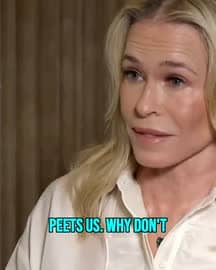
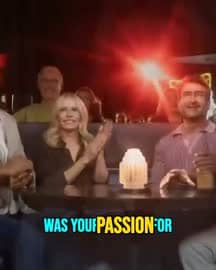



One cell, opened
The caption is written for Instagram, not borrowed from TikTok.
Every clip gets its own Instagram caption, in the language spoken in the video: a hook short enough to survive the feed's cut, two or three sentences of context, a call to action that changes from clip to clip, and 5–8 hashtags spanning niche, mid-range and broad reach.
Reel 1 of 6
Kevin Hart is NOT playing around for his upcoming Netflix roast! 🔥
He's promising a "complete massacre" and a "world of rebuttal."
Which comedian do you think will try to roast him the hardest? Tell us below!
Hashtags
- #KevinHartRoast
- #NetflixIsAJoke
- #StandUpComedy
- #ComedyKing
- #MotherdayRoast
Everything below this line is hidden in the feed until someone taps. That is why the first line is written to stand on its own.
Real output: the clip, the caption and the hashtags are exactly what AutoShorts produced for this moment.
Which moments become Reels
It reads what was said, then picks.
AutoShorts transcribes the video word by word and scores the transcript for complete thoughts, hooks and payoffs. It reads the words, not the picture — so a moment is chosen because it holds up on its own, not because something moved on screen.
3–15 Reels per upload
How many you get depends on how much of the video stands alone. One credit each, so your credits set the ceiling.
15 to 60 seconds each
Instagram allows longer, but that band is where a single moment plays without padding.
Your own footage
A YouTube link, or an MP4, MOV or WebM file — a podcast, an interview, a stream, a webinar, a talk.
How each one is framed
Vertical, and pointed at whoever is on camera.
A landscape video centre-cropped to 9:16 loses the person talking. AutoShorts crops around a detected face instead, and moves the frame the way a camera operator would.
9:16 at your source resolution
The height comes from your file, so a 1080p upload stays 1080p. Nothing is upscaled to hit a round number.
Face-tracked, not snapped
The crop follows the face it locks onto, and the camera pans like a heavy tripod — it resists jumping, so the Reel does not twitch.
Scene-aware
Shot changes are detected per clip. A shot with no clear subject falls back to a centred layout on a blurred background rather than guessing.
Captions you can burn in
Animated captions, one click after the Reels land.
Burned-in captions are a separate step, not part of the automatic run. Pick any clip, choose one of 6 styles, and AutoShorts renders the words into the picture so they play with the sound off.
Unlocked by any credit pack. The free trial produces Reels without burned-in captions.
Download and post
You post it. We hand you everything to post with.
AutoShorts does not upload to your Instagram account. You download the finished Reel and post it yourself, with the caption it wrote already on the clipboard.
The video
A 9:16 MP4, watermark-free once you have bought any credit pack.
The caption
Copy it from the clip's card, edit anything you want, paste it into Instagram.
The hashtags
Already at the end of the caption, so they travel with it in one paste.
What it costs
One credit per Reel. Nothing to cancel.
1 credit = 1 Reel
You get 3 credits at signup, so the first 3 Reels are free. Credits do not expire.
Trial and paid limits
Videos up to 15 minutes and 300 MB on the free trial; 90 minutes and 2.5 GB with any credit pack.
Watermark on the trial
Trial Reels carry a small autoshorts.app watermark. Any credit pack removes it, and free signup credits do not.
One video at a time
AutoShorts processes a single video per account at once, so a long upload does not queue behind another.
Questions
Before you upload
Can AutoShorts post my Reels to Instagram for me?
No. AutoShorts makes the Reels and writes the caption; you download the MP4 and upload it to Instagram yourself. Posting straight into a personal Instagram account is not something AutoShorts does today, so the workflow ends with a finished file and a caption ready to paste.
How many Reels do I get from one video?
3–15 per upload, depending on how much of the video holds up on its own. Each Reel costs one credit, so your credit balance sets the ceiling — a 3-credit trial gives you 3.
Do the Reels come with captions on screen?
Not automatically. Burned-in animated captions are a separate one-click step on any clip, in one of 6 styles, and any credit pack unlocks it. Without that step you get a clean Reel with no text burned into the picture.
How long is each Reel?
Between 15 and 60 seconds. Instagram allows longer Reels, but AutoShorts targets that band because it is where one complete moment plays without padding.
What can I upload?
A YouTube link, or an MP4, MOV or WebM file. Up to 15 minutes and 300 MB on the free trial, and up to 90 minutes and 2.5 GB with any credit pack.
Does it work in my language?
Transcription covers around 100+ languages, and the Instagram caption is written in the language spoken in the video rather than translated into English.
Your first 3 Reels are free.
Paste a link and find out what one long video actually contains. No card, no subscription.
3 free clips · 1 credit per Reel · 30-day money-back guarantee on packs
Posting the same clips to TikTok? See the TikTok Video Maker.
More Platform Tools
Create optimized short-form content for every platform
Blog
From the blog
Deeper reading on this topic